






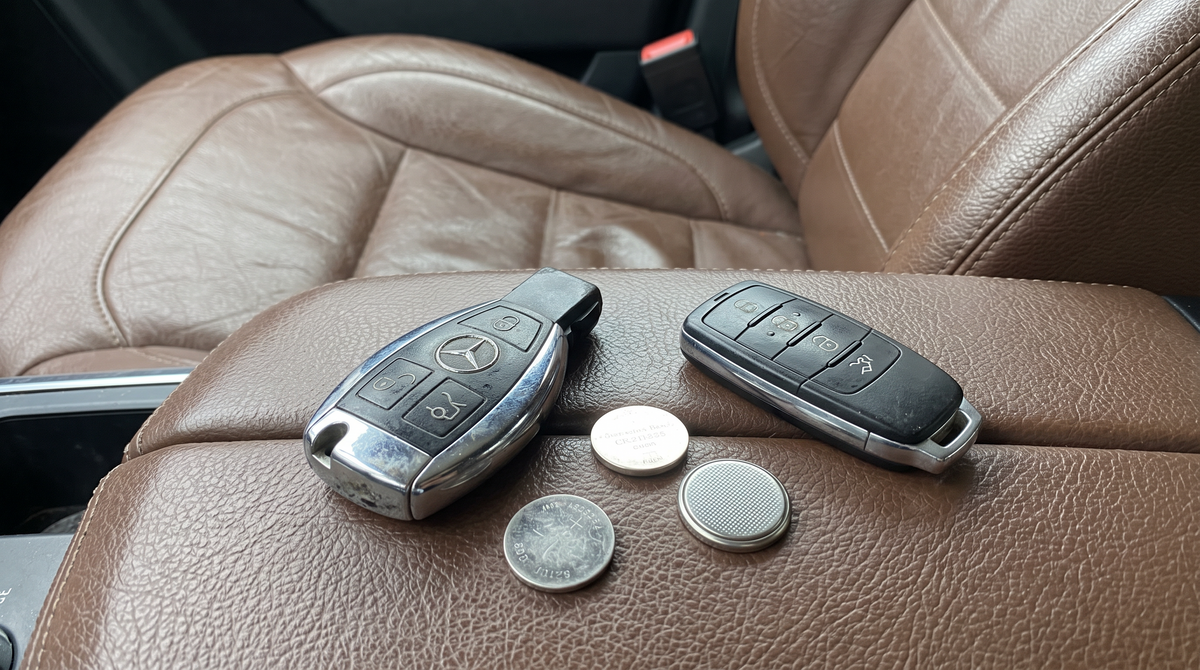
"Key battery low, replace battery" is one of the few Mercedes warnings you can fix yourself in two minutes with no tools. The catch is that Mercedes uses two different key bodies, and they take different batteries: the older chrome arrow key takes two CR2025 cells, the newer flat key takes one CR2032. Open the wrong one the wrong way and you break the chrome trim. Here is the right way for each.
Which Mercedes key do you have?
Put the key on a table. A rounded, teardrop-shaped key with a broad chrome band that rocks when you push it is the chrome arrow key. A flat key shaped like a small bar of soap that sits still is the flat key. An AMG key is one of those two with a black or carbon-look finish. Photos of all three are in our Mercedes key identification guide.

Which battery does a Mercedes key take?
| Key | Typical cars | Battery | Opens by |
|---|---|---|---|
| Chrome arrow key | C-Class W204, E-Class W212, S-Class W221, GLK, ML W166, GL, CLS and most 2008 to 2015 cars | 2 × CR2025, stacked | Blade pushed into the slot on the narrow end |
| Flat key | C-Class W205, E-Class W213, S-Class W222, GLC, GLE W167, A-Class W177, CLA and most 2014 to 2021 cars | 1 × CR2032 | Blade pushed into the slot at the top, cover slides off |
| Newest flat key | C-Class W206, S-Class W223, EQE, EQS, GLC X254 and most 2021 onwards cars | 1 × CR2032 | Same as the flat key |
| AMG key | Any AMG model | Same as the body it is based on | Same as that key |
Mercedes ran both key bodies at the same time for several years, so a 2015 C-Class can have either. Go by the key in your hand, not the model year. And whichever key you have, the battery you take out has its code printed on it; buy that one.
Chrome arrow key: how to change the two CR2025 batteries

- Release the emergency blade. On the back of the key, slide the small chrome or black catch sideways and pull the metal blade out of the narrow end.
- Look at the narrow end of the key. Where the blade was, there is a small rectangular slot in the plastic end cap.
- Push the tip of the blade into that slot. Push firmly and straight in. The end cap with the battery holder pops out of the key body, like a drawer.
- Note which way the batteries face. Two CR2025 cells sit stacked in the holder, both with the printed positive side facing the same way, normally up towards you.
- Tip the old cells out and fit two new CR2025 the same way round. Hold them by the edges.
- Slide the holder back in until it clicks and refit the blade.
Do not try to pry the chrome band apart at the seam. The chrome arrow key is not designed to open that way, and the band will not sit flat again once it has been levered.
Flat key: how to change the CR2032

- Release the emergency blade. Press the small chrome button on the back of the key and pull the blade out from the top edge.
- Find the slot. On the back, where the blade came out, there is a narrow slot in the plastic.
- Push the blade tip into the slot and press. The back cover slides down and off the key. On some versions it lifts rather than slides; either way, it comes away easily with the blade in the slot.
- Lift out the CR2032. It sits with the positive (text) side facing up. Use a fingernail or a plastic pick, not metal tweezers.
- Fit the new cell text side up, slide the cover back until it clicks, and refit the blade.
Key cover on? Remove it before you start
Alcantara and leather covers slide off; carbon fiber shells unclip at the seam. Trying to open the key with the cover on is how both get damaged. We wrote a step-by-step guide to removing a Mercedes key cover.
Key completely dead? You can still drive
Mercedes builds in a fallback for a flat key battery, and it needs no battery at all:
- Open the door with the blade. The lock cylinder on the driver's door is under a small cap on the handle. Lever the cap off with the blade (there is a slot for it underneath), unlock, and open the door. The alarm sounds until the car recognises the key.
- Start the car. On cars with Keyless-Go and a start button, hold the key directly against the start button, logo side up, and press. The car reads the chip through the key's plastic. On older chrome-key cars, pull the start button out of the ignition slot and insert the key itself into the slot, then turn it like a normal key.
Once a new battery is in, everything returns to normal and the "Key not detected" message disappears.
After the battery change
- No programming needed. The pairing is stored in the key's chip and survives any battery change.
- The warning clears itself after one start cycle. If it stays on, the car has not seen a strong signal yet; press lock and unlock once while standing next to the car.
- Still dead? Open it again and check the orientation. On the chrome key, both CR2025 cells must face the same way. Then try a second set of batteries before assuming the key is faulty.
Before you put the key back in your pocket
Have a look at it while it is on the table. The chrome band on the arrow key scratches, and the gloss plastic on the flat key wears shiny around the buttons within a year or two of living with coins and a phone. A replacement Mercedes key is a dealer-only part at several hundred euros and a wait of a week or more, which is why most of our customers put a Mercedes key cover on the day they buy the car. Our Alcantara cover is the same suede as an AMG steering wheel, leaves the star and all the buttons visible, and slides off in a second for the next battery change.

Best overall
Mercedes Alcantara key cover
Cut for the chrome arrow key and the flat key (types A, B, C and F), in Dark Grey, Light Grey, Orange or Green. The star window stays open, so an AMG key still looks like an AMG key.
Good to know: no effect on Keyless-Go or range. Wrong key type is exchanged free.

AMG carbon fiber key cover
A rigid real-carbon shell for the flat key, the same weave as the trim on an AMG dashboard. Unclips at the seam for battery changes.
Good to know: pick the vented version so the antenna area stays open.
Other Mercedes key covers
- Leather, for a tan or brown interior: Mercedes leather key cover
- Carbon, standard flat key: Mercedes carbon fiber key cover
- Everything: Mercedes key cover collection
Common questions
What battery does a Mercedes key use?
The chrome arrow key (roughly 2008 to 2015) uses two CR2025 cells stacked together. The flat key (roughly 2014 onwards) uses a single CR2032. Check the code printed on the battery you remove.
How do I open a Mercedes key to change the battery?
Release the emergency blade, then push the blade tip into the small slot where it came out. On the chrome key the end cap with the battery holder pops out; on the flat key the back cover slides off.
Do I need to reprogram a Mercedes key after replacing the battery?
No. The key keeps its pairing with the car. Close it, press lock once next to the car, and the low-battery warning clears.
How do I start a Mercedes with a dead key battery?
Open the door with the emergency blade, then hold the key against the start button and press. On older cars, remove the start button from the ignition slot and insert the key in its place.
How long does a Mercedes key battery last?
Two to three years with Keyless-Go, longer without it. Keys left near the car keep communicating with it and drain faster.
Can I use one CR2032 instead of two CR2025 in the chrome key?
No. The chrome key's holder is built for two thin cells in series. One thicker cell gives the wrong voltage and may not make contact.
Shop every Mercedes key cover
Alcantara, leather and real carbon covers for the chrome arrow key, the flat key and the AMG key, each cut for one shape and swapped free if the type turns out wrong.
Other brands: see which battery every car key takes or the BMW key battery guide.

Leave a comment
This site is protected by hCaptcha and the hCaptcha Privacy Policy and Terms of Service apply.